
Practice tracking for musicians
Music Practice App
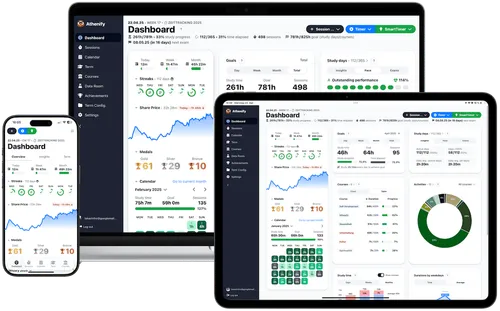
Athenify helps musicians track practice sessions, set goals, and improve skills with detailed analytics. Stay consistent, measure progress, and achieve your musical goals faster.
Goal setting
Set goals and celebrate achievements
Analytics
Track progress with detailed analytics
Practice timer
Log your practice sessions easily
Cloud-based
Access from any device
3 simple steps
How musicians use Athenify

Start the timer
Begin your practice session with our beautiful fullscreen timer. Choose Pomodoro or stopwatch mode.

Track your progress
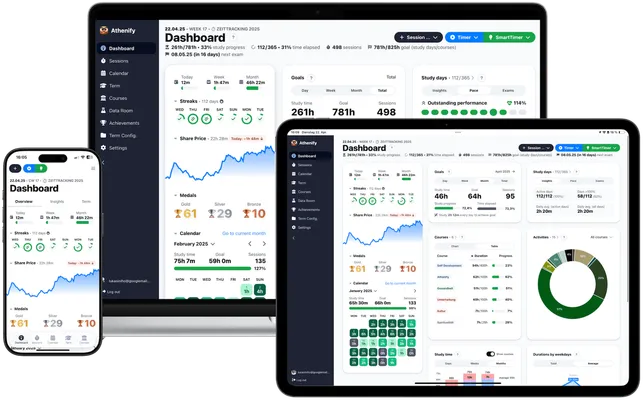
See your practice time accumulate in beautiful charts. Analyze patterns across instruments and techniques.

Stay motivated
Earn medals for great practice days, build streaks, and watch your 'share price' rise as you improve.
Benefits for musicians
What you'll achieve
Build consistency
Streaks and daily goals help you practice every day, even when motivation is low.See real progress
Visualize your improvement over weeks and months with detailed statistics.Balance your practice
Track time across different techniques, pieces, and instruments to ensure well-rounded progress.Stay accountable
The timer doesn't lie – know exactly how much you practiced, not how much you think you did.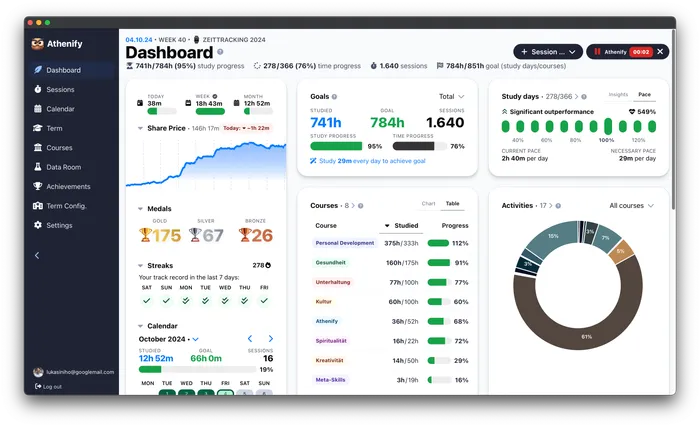

FAQ
Questions about music practice tracking
Can I track multiple instruments?
Yes! Create separate 'subjects' for each instrument or technique (e.g., Piano, Guitar, Scales, Sight-reading). You can set individual goals for each and see how your time is distributed across them.
Is Athenify good for music teachers?
Absolutely. Many music teachers use Athenify to track their own practice and recommend it to students. The visual progress and gamification features are especially motivating for younger students.
How is this different from a practice journal?
A paper practice journal requires manual calculations and offers no analytics. Athenify automatically tracks your time, generates statistics, and uses gamification to keep you motivated. You can also add notes to each session if you want journal-style reflections.
Can I track specific pieces I'm working on?
Yes! Use the 'activities' feature to create categories for different pieces in your repertoire. This way you can see exactly how much time you've spent on each piece.
Does the timer work offline?
The timer works as long as you have the app open. Your sessions sync to the cloud when you're back online, so you never lose practice data even with spotty internet.